

Our Tampa Limo Blog
How to Find Your Tampa Airport Private Pickup Zone
Last Updated: November 5, 2026
Quick Summary
Private vehicles at Tampa International Airport usually wait at designated spots rather than the general taxi or rideshare lanes. Your driver should confirm the terminal, level, and nearest landmark before you land, so you can find your airport pickup zones quickly.
- Confirm your arrival terminal with your driver before your flight lands.
- Match the level your driver confirmed before you exit the terminal building.
- Share your flight number so the driver can track delays and adjust timing.
- Agree on a backup meeting point in case the main zone is crowded or closed.
- If your driver does not answer, call the company's dispatch line from your booking confirmation.
Table of Contents
- Where Private Vehicles Pick Up Passengers at Tampa International Airport
- Tampa International Airport Pickup Instructions Before You Land
- Setting a Tampa Airport Pickup Meeting Point With Your Driver
- Step-by-Step: Finding Your Pickup Zone on Arrival
- Using an Airport Pickup Text Message Template
- How Long to Expect an Airport Pickup Wait Time
- Common Pickup Mistakes and What to Do If Your Driver Is Not at the Zone
- Booking Your Tampa Airport Pickup With Prestige Black Car Service
- Frequently Asked Questions
Finding the right spot among the airport pickup zones at Tampa International Airport (TPA) can feel confusing when you are tired, carrying bags, and waiting for a driver. Private vehicles do not always use the same curb as rideshares or taxis. Knowing where your driver will meet you saves time and stress. Prestige Black Car Service, a Tampa Bay company founded by locals, put together this guide to help you find your private pickup zone quickly and confidently.
Where Private Vehicles Pick Up Passengers at Tampa International Airport
Private vehicles usually wait at a designated pickup area rather than the general taxi or rideshare lanes. For more context, read our Tampa airport car service guide. Your driver should tell you the exact location of your airport pickup zones before your flight lands. Ask for the terminal, the level, and the nearest landmark.
The airport organizes ground transportation by terminal, so the same company may use different spots depending on where you arrive. Keep these points in mind:
- Know your terminal. Confirm your arrival terminal with your driver.
- Ask about the level. Pickup areas can sit on a curb or a lower level.
- Note the landmark. A sign, column number, or nearby business helps you spot the spot.
- Check your airline app. Gate changes can shift your walk to baggage claim and the curb.
Your driver can also send a photo of the vehicle and the exact curb. That single step prevents most pickup confusion.
Tampa International Airport Pickup Instructions Before You Land
Preparing before you land makes the pickup smooth. Start by saving your driver's contact information and your confirmed pickup details.
Follow these steps before your plane touches down:
- Confirm your flight number and scheduled arrival time.
- Save your driver's phone number in your contacts.
- Check the terminal and baggage claim location for your arrival.
- Share your luggage count and any extra passengers with your driver.
- Turn on your phone's data or Wi-Fi so you can receive messages.
Booking your transfer well ahead also helps. Learn how early to book airport transportation for Tampa flights before your trip. Booking your transfer ahead of time leaves room to adjust if your schedule changes. Once you land, plan to send a short message letting your driver know you are on the ground.
Setting a Tampa Airport Pickup Meeting Point With Your Driver
A clear meeting point prevents most mix-ups. Do not rely on a general location like "the airport." Agree on one specific spot.
Discuss these details with your driver:
- Exact terminal and level
- Curb or lane name, if posted
- Nearest landmark, such as a sign or column
- Backup meeting point if the first spot is crowded
Ask your driver to confirm the plan in writing. A text message gives you a record you can check later. If your flight is delayed, update the meeting point and the time right away.
Step-by-Step: Finding Your Pickup Zone on Arrival
Once you collect your bags, work through the arrival in a fixed order so you are not improvising at the curb.
- Confirm you are on the right level before you exit. Follow signs for ground transportation and match the level to the one your driver confirmed. If the sign points to a level your driver did not mention, stop and message the driver before you walk outside.
- Check your phone for the driver's latest message. Confirm the terminal, curb or lane, and landmark. If there is no message, send one before you leave the building, coverage outdoors is often worse than inside.
- Walk to the designated area and stay near the posted landmark. Column numbers, sign letters, and door numbers are more useful than "near the exit" because they are fixed and visible from a distance.
- Look for the vehicle and the driver, not just the car model. Many drivers hold a name sign; matching the plate to the confirmation is faster than matching the make and color.
- Send a short location message. For example: "Curb 3, near the blue column, wearing a navy jacket." Specific beats vague every time.
Branch A, the zone is crowded or closed. If the posted pickup area is jammed or barricaded, do not wander.
Branch B, the driver is not there and has not messaged. Call once, then text with your terminal, level, and landmark.
Branch C, you are at the wrong terminal. Do not walk to the other terminal on your own unless the driver confirms it is faster than waiting.
Branch D, your flight landed early or late. Send an updated arrival message as soon as you have signal. Drivers who track flights will adjust, but a message closes the gap when tracking data lags.
Watch out: the most common failure is exiting the building before confirming the level and landmark, once you are outside, you lose the signage that would have told you where you are.
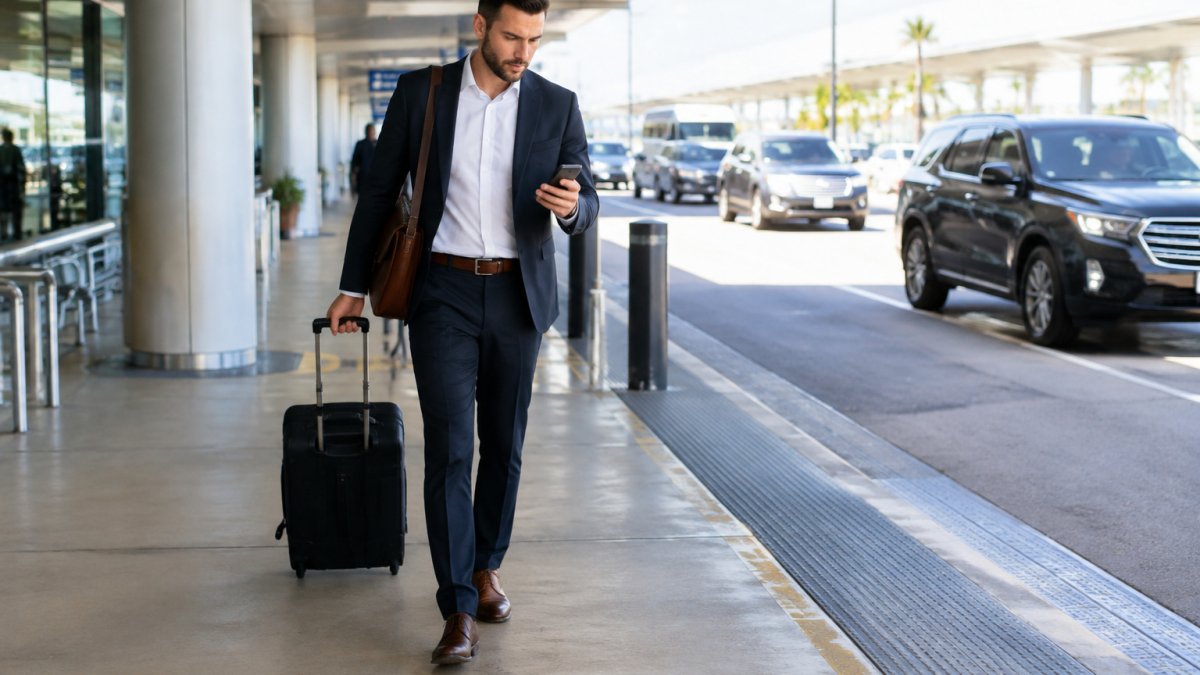
A business traveler pulling a rolling suitcase along a covered airport curb while looking at a phone for directions to the pickup area is a common sight.
Use this quick reference to check each step before you leave the terminal.
| Step | What to do | Time or frequency |
|---|---|---|
| Confirm level | Match the level to your driver's message before exiting | Before you walk outside |
| Check messages | Confirm terminal, curb or lane, and landmark | Once you have signal |
| Stay at landmark | Wait near the posted column, sign, or door number | Until the driver arrives |
| Identify driver | Look for the driver and name sign, not only the car model | On arrival at the zone |
| Send location | Share a specific landmark and clothing detail | Once you are at the zone |
| Backup spot | Move to the agreed backup point if the zone is closed | If the zone is crowded or barricaded |
| Call dispatch | Use the number on your booking confirmation | If the driver does not answer within a few minutes |
Using an Airport Pickup Text Message Template
A short, clear message helps your driver find you fast. Copy and adjust this template:
"Hi [Driver name], this is [Your name]. I have landed on flight [Flight number] at [Terminal]. I am heading to [Curb or landmark] now. I have [number] bags and [number] passengers. I will wait near [landmark] and will wear a [clothing color]."
Send the message once you are walking toward the pickup area. Include your flight number so the driver can check for delays. If your plans change, send an update right away.
How Long to Expect an Airport Pickup Wait Time
Wait times vary with airport traffic, baggage claim speed, and your flight's arrival time. Many travelers are picked up within a short window after they reach the curb, but delays happen during busy travel periods.
Plan for these factors:
- Baggage claim can take longer on busy flights.
- Peak travel times may increase curb traffic.
- Weather and delays can shift arrival times.
Ask your driver how they track flights. Ask your driver how they track flights so they can adjust timing if your arrival changes.
Common Pickup Mistakes and What to Do If Your Driver Is Not at the Zone
Most pickup problems come from a few simple mistakes, and most are fixable within minutes if you act in the right order.
The mistakes that cause most problems:
- Waiting at the wrong terminal. Double-check your terminal against the confirmation before you walk.
- Not sharing the flight number. Your driver cannot track your arrival without it.
- Assuming the spot is the same every time. Confirm the curb and level for each trip.
- Ignoring messages. Keep your phone on and check it after you land.
- Exiting before confirming the level. Signage inside the building is your best map; outdoors it is gone.
The recovery sequence when your driver is not at the zone:
- Call or text your driver using the number you saved. One call, then a text with your terminal, level, and landmark.
- Share your exact location in the message, including the nearest column, sign, or door number.
- Check your booking confirmation for the company's dispatch or main contact number.
- Call dispatch if the driver does not answer within a few minutes. Dispatch can reach the driver through a channel you cannot.
- Stay in a safe, visible spot near the curb rather than walking the length of the terminal.
Set realistic expectations about what can be fixed. A driver who is circling, stuck in traffic, or at the wrong curb is usually recoverable within minutes once you share a precise landmark.
Keep an evidence trail as you go. If the pickup fails, the record you build in the moment is what supports any later refund or card dispute. Save:
- A screenshot of your booking confirmation showing the agreed pickup time, terminal, and meeting point.
- Your text or call log with the driver, including timestamps.
- A screenshot of any driver messages and your replies.
- A photo of the curb or landmark where you waited, with the time visible if possible.
- The name of the dispatch agent you spoke with and the time of the call.
A short message template you can adapt:
"Hi [Driver name], this is [Your name]. I am at [terminal, level, landmark] and have not seen the vehicle. My flight [number] landed at [time]. Please confirm your location or ETA. I have [number] bags and [number] passengers."
When to escalate rather than keep waiting. If the company cannot confirm a driver or a replacement within a reasonable window, ask for written confirmation of the cancellation and the refund amount before you book an alternative ride.
Watch out: leaving the pickup area to search for the driver is the single most common way a fixable mix-up turns into a missed ride, the driver arrives at the agreed landmark after you have walked away.
Calling the company's dispatch line is a good backup if your driver does not answer.
Booking Your Tampa Airport Pickup With Prestige Black Car Service
Prestige Black Car Service provides premium private transportation across the Tampa Bay region, including airport transfers. Our punctual, professional drivers keep communication clear from booking to pickup, and our vehicles are spotless and well-maintained.
For pickup planning, we recommend the following:
- Share your flight number and terminal when you book.
- Confirm the meeting point with your driver before you land.
- Keep your phone on so your driver can reach you.
Our fleet includes luxury cars, Sprinter limos, and party buses, so you can choose a vehicle for your party size. To check availability, review our vehicle options, or request a quote for your Tampa airport pickup, contact our luxury transportation team or browse our luxury transportation services. You can also see our luxury vehicle fleet to choose the right ride for your group.
Ready to skip the guesswork at the curb? Book your Tampa airport transfer with Prestige Black Car Service today and arrive with confidence.
Frequently Asked Questions
Where can private vehicles pick up passengers at Tampa International Airport?
Private vehicles, including pre-booked black car and limo services, generally wait in designated areas rather than at the main terminal curb used by rideshare and taxi drivers. Pickup locations can change as airport operations change, so check the current signage and your driver's confirmation before you travel. Your booking confirmation should name the exact meeting point, and your driver can confirm it with you by text or phone before you land.
Can a private driver meet me at baggage claim at Tampa International Airport?
Ask when you book whether a meet-and-greet at baggage claim is available, and share your airline, flight number, and bag count so the driver can plan the pickup.
What should I do if my driver is not at the pickup zone?
First, check your confirmation for the exact meeting point, then send a text message with your location and your flight details. Allow reasonable time for traffic and terminal walking distances. If the driver still cannot be located, call the dispatch line listed on your booking. Keep your confirmation number handy so the company can locate your reservation quickly.

‹ Back
Recent Posts
-

How to Book Wedding Transportation for Guests, Step by Step
November 10, 2026
-

How to Find a Car Service Quickly When You Need One
November 9, 2026
-
Can You Prebook Tampa Airport Transportation for Late Flights?
November 9, 2026
-
How to Manage Executive Travel Logistics in 2026
November 8, 2026
-
How to Schedule Recurring Airport Pickups Step by Step
November 7, 2026